The AI agent that helps quality teams with every task
Ask questions about your procedures, analyze documents, prepare reports, and tap into your company knowledge base — all in one AI assistant designed for quality processes.
One AI agent for all of your company's quality knowledge
AI FLEXIBILITY
Always the best LLM model
Get access to the leading AI models in one place. Whether you need GPT, Gemini, or Claude, dynamically pick the tool that best fits the task in front of you.
INTEGRATIONS
Your intelligent knowledge base
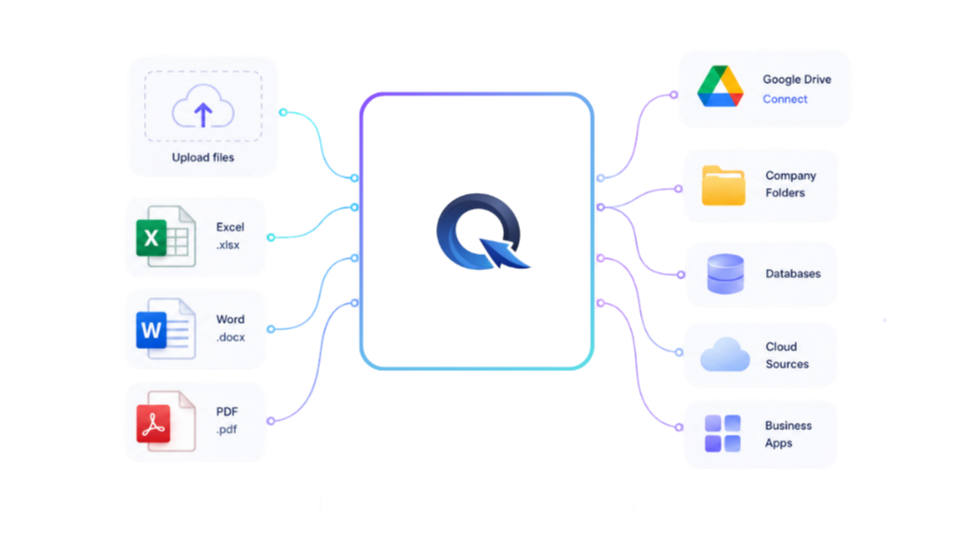
Connect the system to all of your company knowledge, integrate with external apps, and easily upload your own files. Build a personalized workspace where AI always draws on your up-to-date data.
AUTOMATION
Reports and documents in an instant
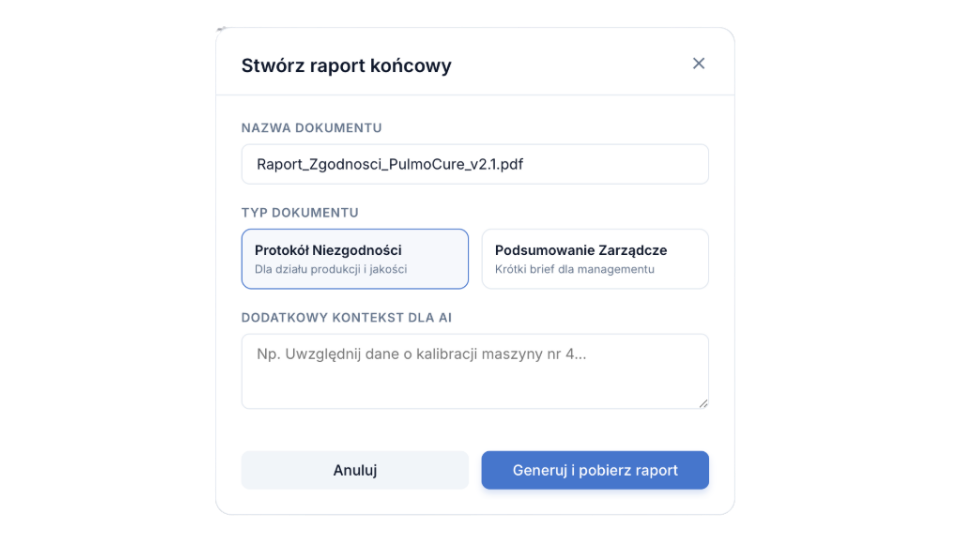
Turn tedious work into simple text commands. Our system automatically generates even the most complex tables, reports, and summaries. Save time and focus on analysis, not document creation.
QUALITY CONTROL
Product and standards management
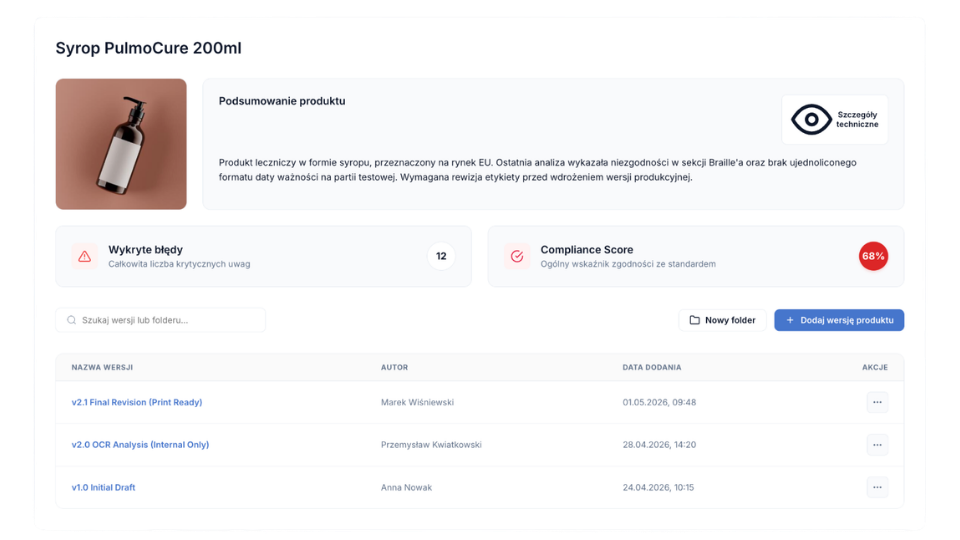
Evaluate and verify unique products against internal factory standards and the most rigorous global quality norms. Give your company the highest level of safety and operational compliance.
See where QENSA saves the most time
The biggest gains come from tasks that today require searching, copying, comparing, and manually piecing together information from many documents.
Choose an AI model
GPT-5.6
Claude Fable 5
Gemini 3.1 Pro
All the best models in one place
Get access to ChatGPT, Claude, and Gemini without separate subscriptions. Dynamically pick the tool that will handle your document analysis best.
What is the procedure for a temperature deviation?
Procedure QP-14
Section 4.2
Found in documents
Find a procedure in seconds
Instead of digging through folders and emails, just ask a question. QENSA finds the right procedure, instruction, or document fragment.
Knowledge Base
W
X
Google Drive Sync
Add files
Build your own knowledge base
Integrate with Google Drive, upload Word, Excel, and PDF documents, or add more threads to a conversation so the AI always has your team's full context.
Create reports much faster
QENSA helps you organize inspection and audit data, then prepare a clear summary. Never start from a blank page.
Complaint no. 4092
Similar case
Corrective action
Product document
Analyze complaints faster
QENSA helps you gather previous cases, corrective actions, and product documentation in one place, laying the groundwork for a decision.
Validation
Specification
Compliant
Requirements
Review
Support compliance checks
QENSA cross-checks information across specifications, instructions, and documentation, making it easier to catch discrepancies without manual comparison.
Create a free account and try QENSA on your own documents
Start working with an AI assistant for quality: ask questions about procedures, analyze documents, and prepare reports and summaries faster.
QENSA was designed for working with sensitive quality documentation: procedures, specifications, audit reports, and complaints. The system can run in a configuration tailored to your organization's security requirements — with access control, a company knowledge base, source citations, and cloud or on-premise deployment options.
ISO Compliance
Data Encryption
Privacy (No-Training)
Access control
Access to knowledge and documents can be limited to authorized users, teams, or roles, so QENSA fits neatly into your organization's structured way of working.
Company knowledge base
QENSA answers based on your uploaded procedures, instructions, reports, and specifications, so your team works with the organization's knowledge rather than the model's general knowledge alone.
Cloud / On-Premise
Depending on your organization's needs, QENSA can be deployed in a model that matches your security requirements and IT architecture, making it easier to align the solution with internal policies.
QENSA vs. general-purpose AI tools
ChatGPT and similar tools help you write. QENSA helps quality teams work with their own procedures, reports, complaints, and specifications — with more context, control, and repeatability.
Works with your company documents
QENSA answers based on the procedures, instructions, reports, and specifications uploaded by your organization.
Limited / depends on usage
Answers grounded in company context
The system draws on your organization's knowledge instead of relying solely on the model's general knowledge.
Not always
Source citations for answers
The ability to reference the source document, procedure, or section.
Limited
Support for quality processes
Help with inspections, reports, complaints, checklists, and compliance analysis.
General-purpose
Access control
The ability to restrict access to knowledge and documents to selected users, teams, or roles.
Depends on the tool
No use of your content for AI training
Depending on the configuration used, submitted content is not used to train models.
Available in the right configuration
Not always clear / depends on the vendor
Fit for audits and requirements
Important when working with documentation subject to quality, audit, and information security requirements.
Limited
Deployment model
The ability to tailor the solution to your organization's IT requirements and architecture.
Cloud / On-Premise
Usually standard SaaS
An organized knowledge base for your team
One place to work with procedures, instructions, and reports.
Often scattered
Ready for day-to-day operational work
A tool designed for the real tasks of a quality department, not just general AI conversations.
High
Depends on the user
Who is QENSA for?
QENSA works best in organizations that handle a large volume of procedures, instructions, specifications, and quality reports.
Primary industry
Manufacturing
QENSA supports companies that work with procedures, instructions, specifications, quality reports, and knowledge scattered across departments.
Quality managers
Faster access to the information, reports, complaints, and documentation needed for decisions.
Quality specialists
Less manual searching for procedures, comparing documents, and preparing summaries.
Auditors and compliance
Easier checklist preparation, source lookup, and documentation organization.
Management and operations
Better knowledge availability, shorter response times, and more transparent quality processes.
Simple, transparent pricing
One plan with full access to every feature. No hidden costs.
Pro Plan, monthly
$30/ month
Without auto-renewal: $36 / month
Pro Plan subscription for 30 days with automatic renewal.
Full freedom to use the app on the Pro Plan
AI Chat — an intelligent, personalized assistant powered by the latest AI models
Product evaluation & standards — create your own standards and evaluate products against them
Document analysis — upload files, build your own knowledge base, and analyze faster with AI
Report generation — automatic reports built from your materials and needs
Excel analysis — spreadsheet analysis and calculations
Web search — up-to-date answers with cited sources
The subscription renews automatically until you cancel.
Let's talk about QENSA at your company
Questions about plans, a company-wide rollout, team training, or custom pricing? Write to us — we'll help you find the best way to use QENSA in your organization.
We'll match a plan to your quality team's needs
We'll walk you through a rollout on your company's documents
We'll prepare training for your team
We quote custom and Enterprise projects
We most often help companies with:
Quality inspections
Internal audits
Procedures and instructions
Reports and complaints
Ready to optimize your quality processes?
Log in to the dashboard and manage your documents with the Qensa Agent.
QENSA is an AI assistant for quality teams that helps you work with company documentation: procedures, instructions, reports, specifications, complaints, and checklists. It lets you ask questions, generate summaries, find information quickly, and bring order to everyday work with quality documents.
2. How is QENSA different from general-purpose AI tools?
General-purpose AI tools are designed for broad use. QENSA focuses on the context of quality teams: procedures, reports, inspections, audits, complaints, and the company knowledge base. That lets it support your work in a more structured way, taking your organization's documents and answer sources into account.
3. Does QENSA answer based on our documents?
Yes. QENSA can work with your company's uploaded knowledge base, such as procedures, instructions, specifications, reports, checklists, and complaint documentation. Answers are then grounded in your organization's context rather than only in the AI model's general knowledge.
4. What documents can be uploaded to QENSA?
QENSA works with quality and operational documents, including procedures, work instructions, product specifications, inspection reports, audits, checklists, forms, and complaint documentation.
5. Does QENSA cite the sources of its answers?
Depending on the configuration, QENSA can point to the documents, sections, or procedure names an answer is based on. This makes it easier to verify information before using it in a report, analysis, or operational decision.
6. Is our data used to train AI models?
QENSA can run in configurations where submitted content is not used to train AI models. This is particularly important for organizations working with documentation subject to information security, audit, or ISO requirements. Details depend on the chosen deployment model.
7. Is QENSA safe for company documentation?
QENSA is designed for working with company knowledge in a controlled environment. Depending on your organization's requirements, this can include access control, a dedicated document base, no-training configurations, and cloud or on-premise deployments.
8. Can user access be restricted?
Yes. In the appropriate configurations, access to knowledge and documents can be limited to selected users, teams, or roles. This lets you align QENSA with your organizational structure and internal access policies.
9. Can QENSA run on-premise?
For Enterprise projects, we can discuss a deployment model tailored to your IT and security requirements, including cloud or on-premise options. The scope depends on your organization's needs, your infrastructure, and the scale of the project.
10. Does QENSA integrate with company systems?
As part of custom or Enterprise projects, we can discuss integrations with selected systems such as ERP, MES, document repositories, knowledge bases, or other tools used at your company. The scope of integration is agreed individually.
11. Does QENSA replace an ERP or MES system?
No. QENSA does not need to replace your existing systems. Its role is to make working with knowledge, documents, and organizational context easier. It can act as an AI layer supporting information retrieval, summary generation, document analysis, and the quality department's operational work.
12. How can QENSA help a quality department?
QENSA can support, among other things, quickly finding procedures, preparing reports, analyzing complaints, creating summaries, comparing documents, working with checklists, preparing for audits, and onboarding new employees.
13. Can QENSA help with audits?
Yes. QENSA can support audit preparation by quickly finding procedures, organizing documentation, generating summaries, creating checklists, and highlighting information that needs verification. It does not, however, replace the responsibility of quality specialists or a formal audit assessment.
14. Can QENSA generate reports?
Yes. QENSA can help create report drafts, inspection summaries, complaint overviews, audit conclusions, and lists of corrective actions. You can then verify and refine the generated content before using it.
15. Can QENSA analyze complaints?
QENSA can support complaint analysis by summarizing submissions, finding similar cases, pointing to related documents, and helping prepare a consistent response or a list of actions for further verification.
16. Do QENSA's answers need to be verified?
Yes. QENSA supports the team's work but does not replace the responsibility of quality specialists. AI answers should be treated as support for information retrieval, analysis, and reporting, and formal decisions should be verified by the people responsible.
17. How long does a QENSA rollout take?
Rollout time depends on the project scope, the number of documents, security requirements, and any integrations. A simpler setup can be up and running quickly, while company-wide or Enterprise rollouts require an individual scoping discussion and knowledge base preparation.
18. Do you help prepare the knowledge base?
Yes. Depending on the project scope, we can help prepare, organize, and optimize the knowledge base so QENSA can work better with your company's documents.
19. Do you offer team training?
Yes. We can prepare training on using QENSA and on the practical use of AI when working with quality documentation, reports, procedures, and inspections. We tailor the training scope to your organization's needs.
20. What kinds of companies is QENSA for?
QENSA is intended primarily for companies that handle a large volume of procedures, instructions, reports, specifications, and quality documents. It works particularly well in the quality departments of manufacturing companies and in organizations where compliance, repeatable work, and fast access to knowledge matter.
21. Can we test QENSA before rolling it out?
Yes. The best way to see QENSA's value is to work with sample documents and scenarios from your organization. That lets you quickly assess how the system performs in the real tasks of your quality department.
22. Do we need perfectly organized documentation?
Not necessarily. Well-organized documentation helps you get better results, but QENSA can also help identify problems in your current knowledge base, such as duplicates, outdated versions, or scattered information. For larger rollouts, it is worth planning a document preparation phase.
23. Does QENSA only work for the food industry?
No. QENSA is particularly useful in the quality departments of manufacturing companies, including food producers, but its applications can be broader. It fits anywhere teams work with procedures, instructions, reports, inspections, audits, and operational documentation.
24. How does custom pricing work?
Custom pricing depends on the number of users, the rollout scope, the volume of documents, security requirements, integrations, training, and a possible cloud or on-premise model. The best approach is to contact us to discuss your organization's needs and prepare a tailored offer.
25. Who should be involved in discussing a QENSA rollout?
Ideally, the conversation includes someone responsible for quality, documentation, operational processes, or IT. That helps us understand how you currently work with documents and propose the best QENSA rollout model faster.
 AI for quality teams and company documentation